


Genres window
 Please move your pointer over the image below (and then left click it)…

Textbox of new genre to transfer in the genres list▲ Back to top
Here you can write your desired custom genre to transfer in the genres list and then press add button.
Add new genre in the genres list▲ Back to top
With this button you transfer a new genre, written in nearby textbox, to the genres list.
The genres list▲ Back to top
Here is the list of your custom genres. If you double-click an item of the list, you automatically close this window and make active clicked genre in genre field of main window. If you click an item of the list, you make it selected. You can sort this list alphabetically using the sort checkbox.
Delete selected genre from the genres list▲ Back to top
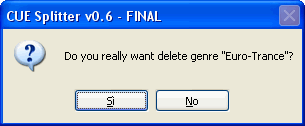
With this button you can delete selected genre from the genres list. If no item is selected, this button is disabled. A confirmation message appear before genre is delete, like the screenshot below.▲ Back to top
Modify selected genre from the genres list▲ Back to top
With this button you can modify selected genre from the genres list. If no item is selected, this button is disabled. You can edit selected genre using a dialog similar to next screenshot:▲ Back to top

Clear the whole genres list▲ Back to top
With this button you can clear the whole genres list. A confirmation message appear before proceding, like the screenshot below. ▲ Back to top

Alphabetically sort the genres list▲ Back to top
If this option is checked, the genres list will be sorted alphabetically. If this option is unchecked, the genres list will not be sorted. [Default = unchecked].
Accept and close this window▲ Back to top
If you press this button, current genres list is saved in "Custom_Genres.txt" file, this window is closed and selected genre is activated in genre field of main window.
Cancel and close this window▲ Back to top
If you press this button, current genres list is discarded and this window is closed.