


File mask engine
What is a file mask? ▲ Back to top
A file mask is a string used to generate an output file name. Actually file mask is used in CUE Splitter to generate audio, M3U and CUE file names. A file mask can contain one or more token. A token is a string formed by a percentile sign % followed by an identification character, for example A, t, n, c, and so on. Each token will be replaced by its corrisponding text value when time to generate a file name arrives. File mask is case sensitive, so %A is different from %a. Writing a file mask like "%a - %t" can be interpreted as "artist name - song title", so the %a token will be replaced by the artist name and the %t token by song title. Let's see the list of currently defined tokens...
Defined tokens ▲ Back to top
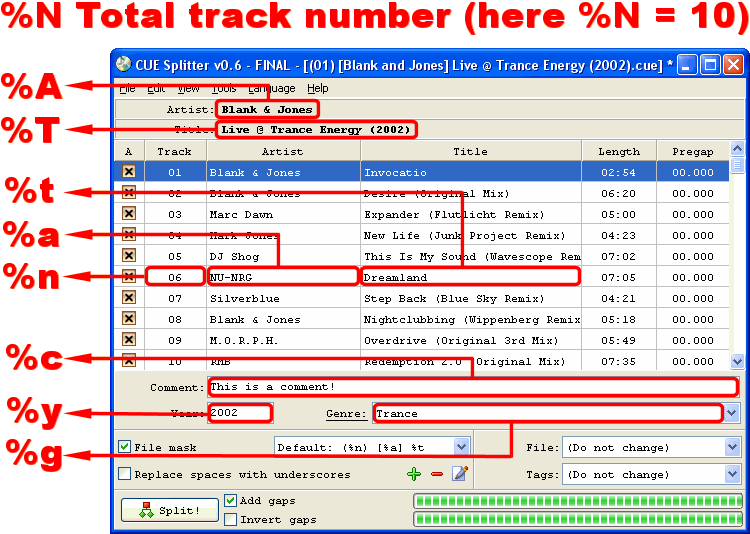
Here is the list of currently defined tokens in CUE Splitter. The screenshot above can help you a lot to understand how a token will be associated to its text value, so view it repeatedly. Defined tokens are:
- %N - Total track number in the album. In this example, token %N will be replaced with 10 (because there are ten tracks in this album).
- %n - Current track number. In this example, token %n will be replaced with 01 for first track, with 02 for second track , with 03 for third track, and so on...
- %A - Artist name for the whole album. In this example token %A will be replaced with "Blank & Jones".
- %a - Artist name for current track. In this example, token %a will be replaced with "Blank & Jones" for first and second track, with "Marc Dawn" for third track , with "Mark Jones" for fourth track, and so on...
- %T - Title for the whole album. In this example token %T will be replaced with "Live @ Trance Energy (2002) ".
- %t - Title for current track. In this example, token %t will be replaced with "Invocatio" for first track, with "Desire (Original Mix) " for second track , with "Expander (Flutlicht Remix) " for third track, and so on...
- %c - Album comment. In this example, token %c will be replaced with "This is a comment!".
- %y - Album year. In this example, token %y will be replaced with "2002".
- %g - Album genre. In this example, token %g, will be replaced with "Trance".
Let's see some examples now....
Example 1 - Default file mask▲ Back to top
In this example we examine the situation of the screenshot above. The default file mask is used, that is "(%n) [%a] %t", in other words "(current track number) [artist name] song title". Here is the generated file names:
- (01) [Blank & Jones] Invocatio.mp3
- (02) [Blank & Jones] Desire (Original Mix).mp3
- (03) [Marc Dawn] Expander (Flutlicht Remix).mp3
- (04) [Mark Jones] New Life (Junk Project Remix).mp3
- (05) [DJ Shog] This Is My Sound (Wavescope Remix).mp3
- (06) [NU-NRG] Dreamland.mp3
- (07) [Silverblue] Step Back (Blue Sky Remix).mp3
- (08) [Blank & Jones] Nightclubbing (Wippenberg Remix).mp3
- (09) [M.O.R.P.H.] Overdrive (Original 3rd Mix).mp3
- (10) [RMB] Redemption 2.0 (Original Mix).mp3
Example 2 - Complex file mask▲ Back to top
In this example we use a complex file mask like this "{Track %n of %N} %a - %t (year %y, genre %g)". Here is the generated file names:
- {Track 01 of 10} Blank & Jones - Invocatio (year 2002, genre Trance).mp3
- {Track 02 of 10} Blank & Jones - Desire (Original Mix) (year 2002, genre Trance).mp3
- {Track 03 of 10} Marc Dawn - Expander (Flutlicht Remix) (year 2002, genre Trance).mp3
- {Track 04 of 10} Mark Jones - New Life (Junk Project Remix) (year 2002, genre Trance).mp3
- {Track 05 of 10} DJ Shog - This Is My Sound (Wavescope Remix) (year 2002, genre Trance).mp3
- {Track 06 of 10} NU-NRG - Dreamland (year 2002, genre Trance).mp3
- {Track 07 of 10} Silverblue - Step Back (Blue Sky Remix) (year 2002, genre Trance).mp3
- {Track 08 of 10} Blank & Jones - Nightclubbing (Wippenberg Remix) (year 2002, genre Trance).mp3
- {Track 09 of 10} M.O.R.P.H. - Overdrive (Original 3rd Mix) (year 2002, genre Trance).mp3
- {Track 10 of 10} RMB - Redemption 2.0 (Original Mix) (year 2002, genre Trance).mp3
Example 3 - Simple file mak▲ Back to top
In this example we use a very simple file mask like this "%n-%t". Here is the generated file names:
- 01-Invocatio.mp3
- 02-Desire (Original Mix).mp3
- 03-Expander (Flutlicht Remix).mp3
- 04-New Life (Junk Project Remix).mp3
- 05-This Is My Sound (Wavescope Remix).mp3
- 06-Dreamland.mp3
- 07-Step Back (Blue Sky Remix).mp3
- 08-Nightclubbing (Wippenberg Remix).mp3
- 09-Overdrive (Original 3rd Mix).mp3
- 10-Redemption 2.0 (Original Mix).mp3